
RGB simulator with SignalRGB and custom effects
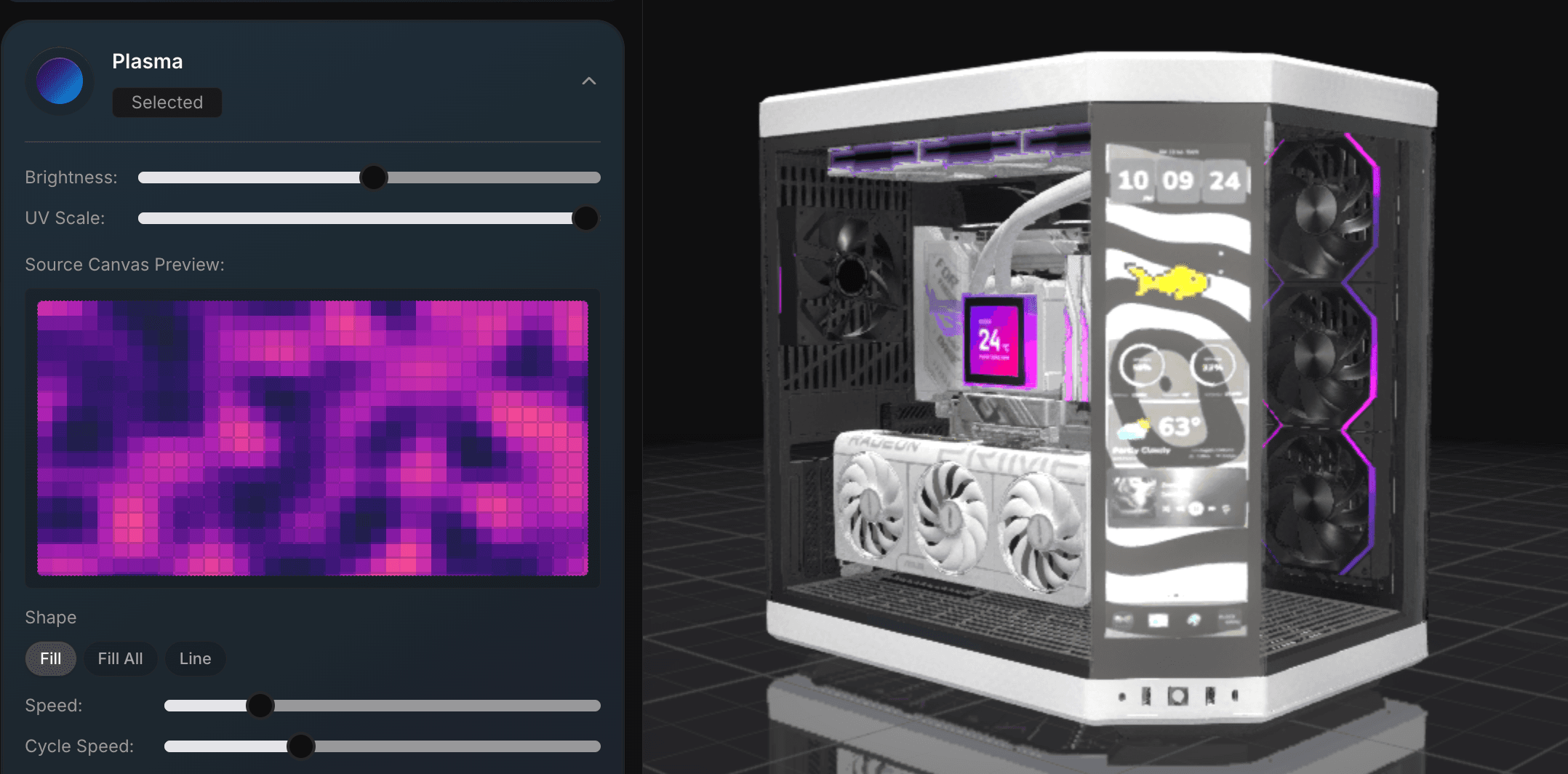
Preview RGB on the actual build instead of relying on product photos. Test lighting colors, standard patterns, SignalRGB effects, and brightness before you buy the parts.
Powered by

Why builders use it
BuildCores keeps the planning tools close to the parts list, so you can check the build, change a part, and keep going without rebuilding the plan somewhere else.
SignalRGB effect library
Switch between standard lighting patterns and SignalRGB effect options directly inside the RGB lighting panel.
Custom color controls
Tune static colors, brightness, and effect controls until the preview matches the build theme you want.
Lighting in context
Preview RGB on the complete PC instead of judging each fan, cooler, or memory kit in isolation.
Where it fits in BuildCores
Use these tools while you are choosing parts, checking the 3D view, comparing prices, or planning the desk around the PC.
Build the theme first
Try white, blackout, vaporwave, aquarium, or rainbow looks while parts are still easy to swap.
Coordinate RGB hardware
Use a shared lighting preview to spot clashing colors across fans, coolers, memory, and case lighting.
Share the finished preview
Share the build or save it as a completed build once the lighting, case, and parts look right together.
RGB Simulator FAQ
Does the RGB simulator control my real hardware?
No. BuildCores is for planning the look. Use SignalRGB or your hardware software to control physical devices.
Can I use custom RGB colors?
Yes. The RGB panel includes custom colors, brightness, and effect controls for supported RGB parts.
Why use an RGB simulator before buying parts?
It helps you catch clashing colors or mismatched lighting before you order hardware.
Explore more BuildCores features
The other feature pages cover nearby steps builders often check before they buy.
3D PC Part Comparison
Learn how to compare PC parts in 3D with side-by-side dimensions, specs, fit context, PC case size comparison, and supported comparison presets for GPUs, coolers, monitors, desks, and more.
ExplorePC Case Size Comparison
Compare PC case sizes in 3D with dimensions, footprint, GPU clearance context, cooler clearance context, and side-by-side case scale before choosing a chassis.
ExplorePC Fan Simulator
Use BuildCores as a PC fan simulator to preview case airflow, fan direction, radiator placement, and cooling layout in a 3D PC build.
ExplorePC Price Comparison
Compare PC part prices from multiple retailers, review regional availability, track price history, and keep build totals current in BuildCores.
ExploreSetup Builder
Plan a complete gaming setup with PC builds, desks, monitors, peripherals, and accessories using BuildCores and Setup Builder.
Explore