
PC fan simulator for airflow-aware builds
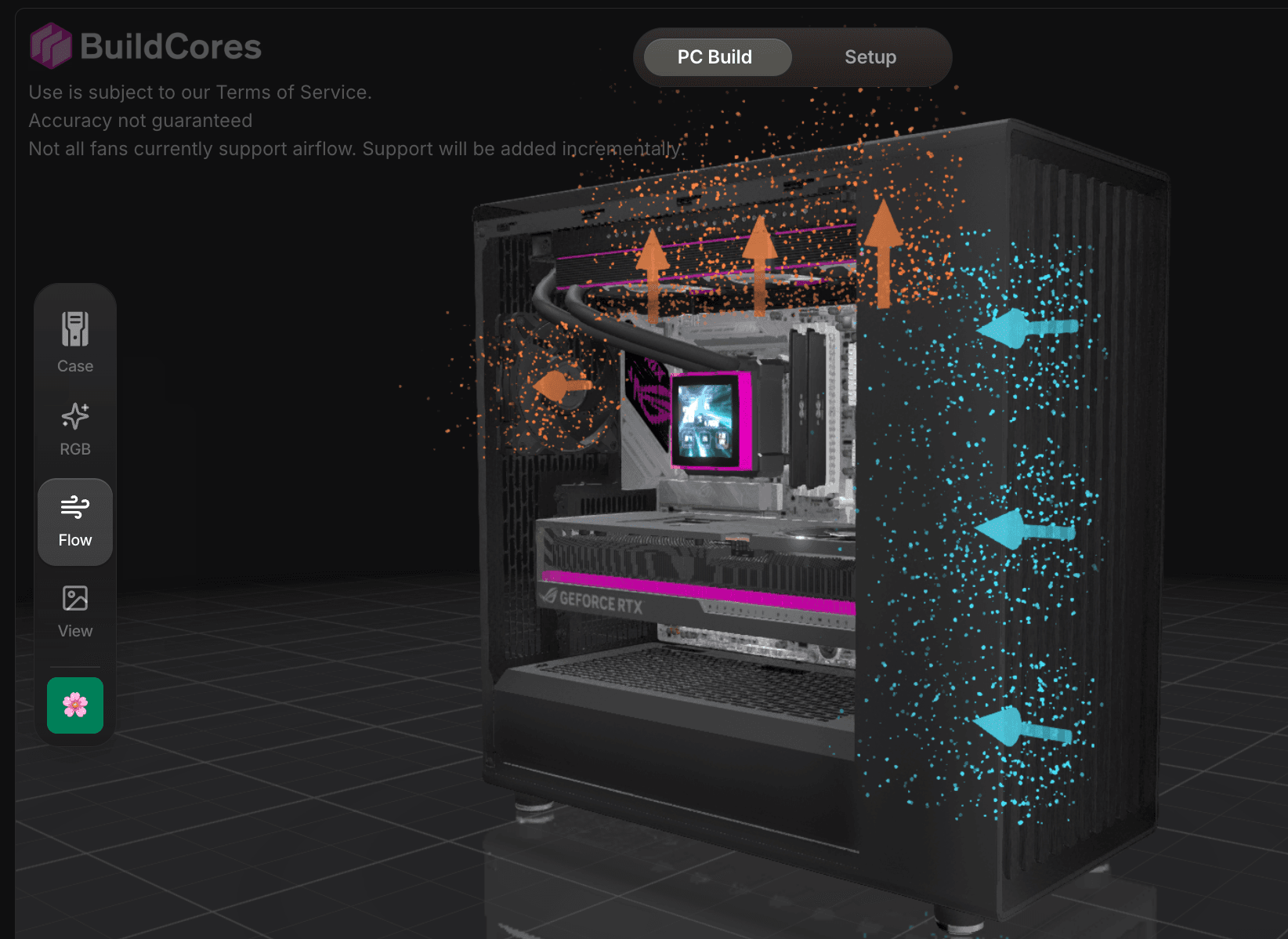
Plan case fan placement before the parts arrive. In supported cases, BuildCores lets you choose fan slots, flip intake or exhaust direction, and show airflow arrows in the 3D builder.
Why builders use it
BuildCores keeps the planning tools close to the parts list, so you can check the build, change a part, and keep going without rebuilding the plan somewhere else.
Fan slot planning
Place case fans in supported chassis and see the cooling layout next to the motherboard, radiator, GPU, and case panels.
Airflow direction
Check which fans are intake or exhaust without translating a diagram back to your case.
Thermal layout context
Review fan choices near radiators, GPUs, and restricted case areas before you buy.
Where it fits in BuildCores
Use these tools while you are choosing parts, checking the 3D view, comparing prices, or planning the desk around the PC.
Why airflow planning matters
Balanced intake and exhaust can keep a PC quieter and cleaner. The airflow view helps catch backwards fans while parts are still easy to change.
What you can tune
Open the case controls in the 3D builder to review fan slots and turn on the airflow overlay when the case supports it.
Check airflow with the full build
Use the fan simulator alongside compatibility checks, 3D placement, and price comparison instead of treating cooling as a separate sketch.
PC Fan Simulator FAQ
Is the BuildCores PC fan simulator a CFD tool?
No. It is a practical visual airflow and layout planner, not a full computational fluid dynamics simulation.
Can I preview intake and exhaust direction?
Yes. Supported builds can show fan airflow arrows so you can check direction while configuring the case.
Does airflow planning work with the rest of the PC builder?
Yes. It sits in the same 3D build flow as part selection, compatibility checks, RGB lighting, and pricing.
Explore more BuildCores features
The other feature pages cover nearby steps builders often check before they buy.
3D PC Part Comparison
Learn how to compare PC parts in 3D with side-by-side dimensions, specs, fit context, PC case size comparison, and supported comparison presets for GPUs, coolers, monitors, desks, and more.
ExplorePC Case Size Comparison
Compare PC case sizes in 3D with dimensions, footprint, GPU clearance context, cooler clearance context, and side-by-side case scale before choosing a chassis.
ExploreRGB Simulator
Preview RGB PC lighting in 3D with SignalRGB effects, custom colors, brightness controls, and lighting zones before buying parts.
ExplorePC Price Comparison
Compare PC part prices from multiple retailers, review regional availability, track price history, and keep build totals current in BuildCores.
ExploreSetup Builder
Plan a complete gaming setup with PC builds, desks, monitors, peripherals, and accessories using BuildCores and Setup Builder.
Explore